Procreate Roses-Butterflies 11 Stamps: A Practical Guide for Digital Artists
Digital illustration often demands a balance between precision and speed. Whether you are sketching a quick concept or refining a final piece, the tools you choose dictate your workflow. The Procreate Roses-Butterflies 11 Stamps set offers a specific solution for artists who want to add organic, intricate details without spending hours painting every petal or wing vein by hand. This collection is not just a pack of images; it is a functional asset designed to integrate seamlessly into your creative process.
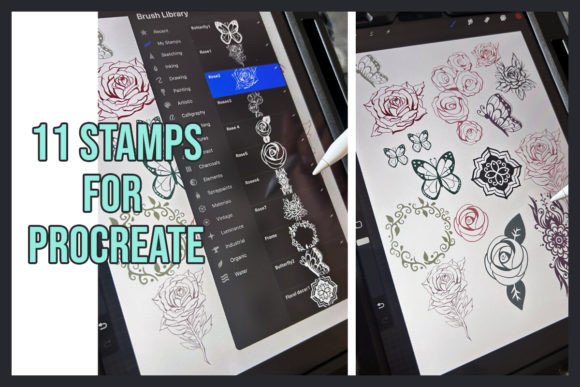
At its core, this resource provides eleven distinct stamp designs featuring roses and butterflies. These are pre-rendered elements that you can place, resize, rotate, and blend directly within the Procreate interface. Unlike static clip art, these stamps are built to mimic the texture and flow of hand-painted elements, allowing them to sit naturally alongside your own brushwork. For anyone looking to elevate their digital sketches with botanical elegance or whimsical movement, understanding how to leverage these assets can transform a flat composition into something dynamic.
Understanding the Asset and Its Setup
Before diving into creative applications, it is essential to understand the technical nature of the file. When you acquire the Procreate Roses-Butterflies 11 Stamps, you receive a single ZIP folder. This format ensures the files remain compressed and organized until you are ready to use them. To get started, you must extract the contents of this folder. Once extracted, the individual brush files need to be imported directly into Procreate.
It is important to note the version compatibility. These brushes are specifically optimized for Procreate Version 5.3. While newer versions of the app generally maintain backward compatibility, ensuring you have at least this version prevents potential rendering issues. The import process is straightforward: long-press on the brush file on your device, select "Share," and choose "Import" within the Procreate Brushes menu. Once imported, they appear in your custom brush library, ready to be tapped and used immediately.
The beauty of this setup lies in its simplicity. There is no complex installation or third-party software required. You move from a downloaded file to an active tool in seconds. This efficiency is crucial for creators who value time and want to focus on the art rather than troubleshooting software.
Real-World Applications for Creators and Entrepreneurs
The versatility of the Procreate Roses-Butterflies 11 Stamps extends far beyond simple hobbyist doodling. In professional and semi-professional settings, these assets serve as powerful accelerators for various projects.
Social Media Content and Branding
For entrepreneurs and marketers, visual consistency is key. Imagine running a boutique floral shop, a wedding planning service, or a lifestyle blog. Creating unique graphics for Instagram stories, Pinterest pins, or email headers can be time-consuming. By using these stamps, you can quickly generate branded backgrounds or overlay elements that reinforce your aesthetic. A butterfly stamp placed subtly over a product photo adds a touch of elegance without distracting from the main subject. Similarly, a rose stamp can frame a text announcement, making it feel more curated and less generic than standard stock photos.
Print-on-Demand and Merchandise Design
Small business owners utilizing print-on-demand platforms like Redbubble or Etsy often struggle to produce high volumes of unique designs. The Procreate Brush set of 11 Stamps of Roses and Butterflies allows designers to mix and match elements to create cohesive patterns. You might combine three different rose variations with two butterfly styles to create a seamless repeat pattern for t-shirts, tote bags, or phone cases. Because the stamps are vector-like in their clarity when scaled correctly, they hold up well in print, offering a professional finish that customers expect.
Educational Resources and Stationery
Teachers and content creators producing educational materials also find value in these assets. Lesson plans, worksheets, and digital planners often benefit from thematic decorations. A biology teacher explaining pollination can use the butterfly stamps to illustrate concepts visually. Similarly, creators designing digital journals or bullet journal templates can use the rose stamps to create beautiful dividers or decorative borders, adding a personal touch that makes the learning or organizing experience more engaging.
Enhancing Your Personal Artistic Workflow
For the individual artist, whether a freelancer or a hobbyist, the primary benefit is the ability to overcome creative blocks and speed up the detailing phase. Painting realistic flowers and insects requires a deep understanding of anatomy, light, and shadow. Even skilled artists may find themselves stuck trying to perfect a single leaf or wing.
These stamps act as a foundation. You can place a rose stamp to establish the form and then paint over it with your own textured brushes to change the color, add depth, or blend it into the background. This hybrid approach saves hours of labor while still maintaining the integrity of your original style. It shifts the focus from "how do I draw this?" to "how do I compose this?", allowing for faster iteration and experimentation.
Consider a scenario where you are illustrating a children's book. You need a scene with a garden full of life. Drawing every flower individually would take days. With the Procreate Roses-Butterflies 11 Stamps, you can populate the scene in minutes, varying the size and opacity of each stamp to create depth and perspective. The result looks hand-drawn because you control the placement and interaction with other layers, but the execution is significantly faster.
Key Considerations Before You Download
While these assets are powerful, they are not a magic wand that replaces artistic skill. Before deciding to purchase or download the Procreate Roses-Butterflies 11 Stamps, consider how they fit into your existing toolkit.
- Style Compatibility: Examine the preview images carefully. Do the roses and butterflies match the aesthetic of your current work? If your style is hyper-realistic, ensure the stamps have enough detail. If your style is abstract or minimalist, check if the stamps are too ornate. They should complement your art, not clash with it.
- Licensing and Commercial Use: Always verify the license terms associated with the download. Most digital asset packs allow for commercial use in products you create, such as merchandise or client work, but restrictions may apply regarding reselling the stamps themselves. Understanding these boundaries protects you legally as you grow your business.
- Device Performance: Although these are lightweight stamp brushes, having multiple layers with high-resolution stamps can sometimes impact performance on older iPad models. Ensure your device meets the minimum requirements for smooth operation, especially if you plan to use them in large-scale compositions.
- Learning Curve: Importing and using stamp brushes requires a basic familiarity with Procreate. If you are brand new to the app, you might spend a little time learning how to adjust spacing, size, and blending modes. However, once mastered, the workflow becomes second nature.
Maximizing Value Through Technique
To truly get the most out of the Procreate Brush set of 11 Stamps of Roses and Butterflies, users should experiment with layer blending modes. Placing a stamp on a "Multiply" layer can make it look like ink, while "Overlay" or "Soft Light" can give it a watercolor wash effect. Changing the hue of the stamp using Procreate's adjustment tools allows you to adapt a red rose to a blue one instantly, expanding the utility of the pack beyond its original colors.
Furthermore, don't be afraid to break the rules. Rotate a butterfly upside down to suggest falling petals or wind. Flip a rose horizontally to create symmetry. Distort the shape slightly using the Transform tool to make it look like it is growing organically from a branch. The goal is to make the digital asset disappear into your artwork, leaving only the beauty of the final image.
Ultimately, the Procreate Roses-Butterflies 11 Stamps is about empowerment. It gives creators the freedom to explore ideas rapidly, produce higher quality work in less time, and bring their visions to life with fewer technical hurdles. Whether you are building a brand, teaching a class, or simply enjoying a quiet afternoon of drawing, these tools provide a reliable bridge between your imagination and the screen.